The / block menu
In insert mode, type / at the start of a line or after a space. Keep
typing to filter (aliases work too: kanban finds Board, h2 finds
Heading 2), move with the arrow keys and press Enter.
Esc closes the menu.
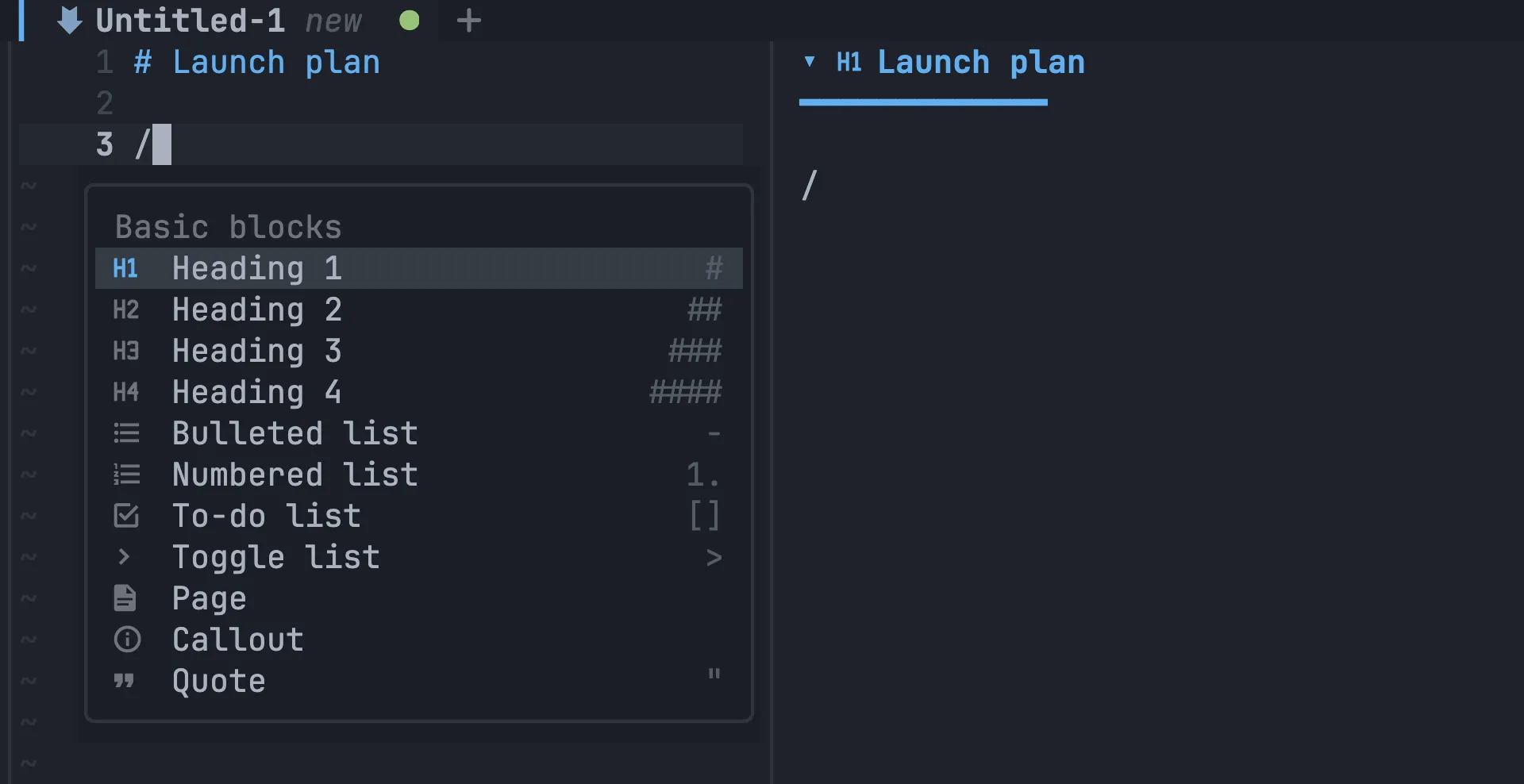
Basic blocks
Section titled “Basic blocks”| Block | Inserts |
|---|---|
| Heading 1–4 | # to #### |
| Bulleted list | - |
| Numbered list | 1. |
| To-do list | - [ ] |
| Toggle list | a collapsible <details> section |
| Page | a new sub-note |
| Callout | > [!NOTE] |
| Quote | > |
| Table | a two-column pipe table |
| Divider | --- |
| Link to page | a link to a note you pick |
Board, Calendar, Timeline, Chart and Form insert a fenced block that the preview draws as an interactive view. See Boards, calendars & more.
Cover, Image, Video, Audio and File open a file picker and copy your file into the workspace. Code inserts a fenced code block. See Images, files & covers.
Table actions
Section titled “Table actions”When the cursor is inside a table, the menu also offers Add row below, Add column right, Delete row, Delete column and Format table.